Updated 2026 · Driver Assistance Systems (ADAS) · Traffic Sign Recognition · All Jolion Trim Levels
Many Haval Jolion owners notice that the car starts beeping once it crosses a certain speed — even when the driver is confident they’re within the limit. In most cases this isn’t a fault at all, but the standard driver assistance system (ADAS) at work, tied to traffic sign recognition and the speed limit warning function.
In this guide we’ll cover how to adjust the speed warning on the Haval Jolion depending on generation and trim, whether the trigger threshold can be changed, why the system sometimes “gets it wrong,” and what to do if the car keeps beeping for no obvious reason.
Why the speed warning function exists
Current Haval Jolion versions come with a set of active safety systems that includes:
- traffic sign recognition (TSR);
- intelligent speed limitation;
- speed limit warning.
A camera mounted at the top of the windscreen, near the rear-view mirror, reads road signs in real time and sends the data to the driver assistance control unit. If the car’s actual speed exceeds the detected limit, the driver gets an alert — audible, visual on the instrument cluster, or both, depending on trim and settings.
The function itself is based on the same principle as Intelligent Speed Assistance (ISA) standards used in many markets, and it’s gradually being rolled out across the whole Great Wall Motor line-up — from the Haval Jolion and Haval M6 up to the larger Haval Dargo and Tank models.
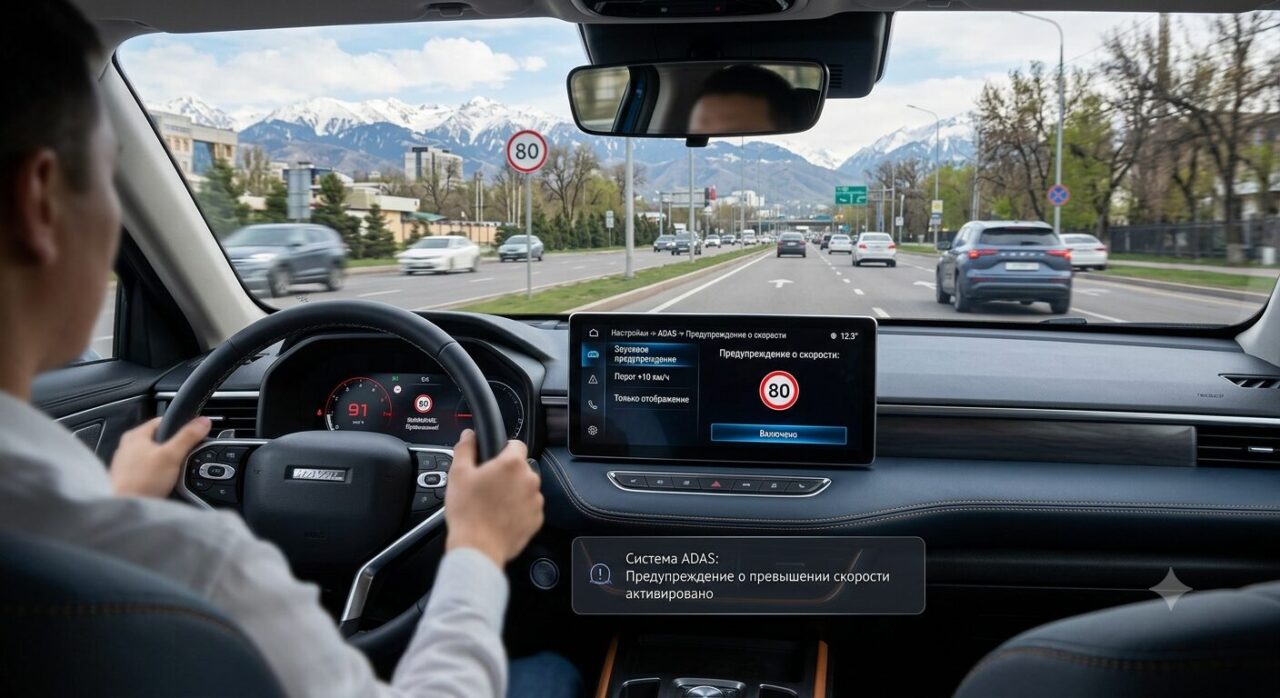
When the system starts warning you
The warning typically appears in these situations:
- exceeding the speed by 5–10 km/h relative to the sign read by the camera;
- exceeding the limit stored in the navigation map data;
- Intelligent Speed Assist being active;
- entering a zone with a temporary limit (roadworks, a school zone, a built-up area).
On some vehicles, the sensitivity threshold and alert type can be changed — covered below.
Differences between Jolion generations and trims
Before hunting for the right menu item, it helps to know that the Haval Jolion ships with several generations of infotainment firmware, and the menu layout differs noticeably between them:
| Version / generation | Where to look | Available options |
|---|---|---|
| Early production (2021–2022) | Settings → Driver Assistance | Sound on/off only, no threshold adjustment |
| Facelift (2023–2024) | Settings → ADAS → Speed Limit | Sound, display, threshold 0–10 km/h |
| Current versions (2025–2026) | Settings → ADAS → Speed Warning | Sound, display, threshold 0–15 km/h, navigation-linked |
Comfort and Elite trims usually get a simplified set of options (sound on/off only), while Elite Plus, Ultra and Ultra Plus, with the extended ADAS package, give access to finer control over the threshold and alert type.
How to change the speed warning: three methods
Method 1: Through the main vehicle menu
- Turn on the ignition (the engine doesn’t need to be running).
- Open Settings on the central display.
- Go to Driver Assistance.
- Select Traffic Sign Recognition.
- Open the Speed Warning tab.
- Choose one of the modes: “Off,” “Display only,” “Sound warning,” or “Sound + display.”
- Save the changes and restart the engine to confirm.
Method 2: Adjusting the allowed margin
On trims with the extended ADAS package, you can set an allowed margin above the limit read by the camera or loaded from the navigation map:
| Threshold setting | When the warning triggers |
|---|---|
| 0 km/h | immediately on any excess over the limit |
| +5 km/h | once you’re more than 5 km/h over |
| +10 km/h | once you’re more than 10 km/h over |
| +15 km/h | once you’re more than 15 km/h over (not available on all versions) |
This significantly cuts down on false and intrusive alerts while keeping the function active — a sensible middle ground for drivers who don’t want to disable the safety system entirely.
Method 3: Through the ADAS menu
On some Jolion versions, especially from 2023 onward, the warning is managed directly from the general driver assistance menu:
Settings → ADAS → Speed Limit → Warning
This usually offers:
- turning the function on or off completely;
- disabling the sound alone while keeping the visual indicator;
- changing the warning threshold;
- an “icon only” mode on the instrument cluster, with no pop-up alerts.
Why the Haval Jolion keeps beeping
If the warning triggers too often without an obvious cause, here are the four most common reasons.
1. The camera has misread a sign
This is the most frequent cause of false alerts. The camera can misinterpret:
- temporary limits in roadworks zones;
- signs on slip roads or side roads that don’t actually apply to the lane the car is in;
- signs intended only for heavy goods vehicles;
- old signs that haven’t formally been removed.
As a result, the system assumes the permitted speed is lower than it really is, and the warning triggers prematurely.
2. The navigation map data is outdated
If the warning combines camera data with navigation map data, discrepancies between the two can cause errors. What usually helps:
- updating the infotainment software;
- updating the navigation map data;
- a full update of the control units at a dealer.
3. Intelligent Speed Assist is switched on
With the intelligent speed assistant active, the car will respond to nearly every excess, even a minor one. Turning off this specific function — rather than the whole ADAS suite — often resolves intrusive alerts without losing the underlying safety benefit.
4. Settings reset after every restart
On some software versions, the system automatically re-enables the warning every time the engine starts. This is tied to active safety standards (including the rules manufacturers follow for exports to the EAEU and the EU) and to how the firmware is implemented — it can’t be switched off in software without a dealer update.
Can the warning be turned off completely
It depends on the model year and the installed software version. For most Haval Jolion units, the available options are:
- disable the sound only, keeping the visual indicator;
- keep just the icon on the instrument cluster;
- increase the allowed margin to its maximum;
- turn the function off entirely (not available on all software, particularly after 2024).
How to stop the constant alert — step by step
If the car keeps sounding the alert, work through these steps in order:
- Check the current settings in the ADAS menu.
- Change the threshold to +5 or +10 km/h instead of 0.
- Turn off the sound alert, keeping the visual indicator.
- Clean the camera area on the windscreen of dust, dirt, or frost.
- Check for available infotainment and navigation map updates.
- If needed, reset the user settings to factory defaults and reconfigure the profile.
If the setting isn’t in the menu
Sometimes owners simply can’t find the relevant menu item. Possible reasons include:
- a base trim without the extended ADAS package;
- an earlier software version that doesn’t support threshold adjustment;
- market-specific localisation of the vehicle;
- menu structure changes after a major firmware update.
In this case, it’s worth checking with an official dealer for a newer software version — updates often add exactly the fine-tuning options that were missing from the original firmware.
Useful tips for the camera and software
To keep the sign recognition system working correctly and avoid false triggers:
- regularly clean the camera area behind the rear-view mirror of dust and condensation;
- don’t block the camera’s view with a dash cam mount or windscreen stickers;
- install software updates from the dealer promptly;
- after any major update, check whether the ADAS settings have changed;
- where possible, use the allowed margin instead of disabling the function entirely — this keeps the safety benefit while minimising false alerts.
Frequently asked questions
Conclusion
The speed warning function on the Haval Jolion exists to improve safety and help drivers stay within posted limits. In most cases it can be tailored to personal preference: the trigger threshold can be changed, the sound alert disabled, or only the visual indicator kept on the instrument cluster. If a software update has changed your settings or made a menu item disappear, it’s worth checking with an official dealer for a newer software version — that usually resolves the issue without a repeat workshop visit.
Related Haval Jolion Articles
Looking for more information about Haval Jolion ownership, maintenance, troubleshooting, and vehicle settings?
Explore our detailed guides, comparisons, and repair articles below:
- Haval Jolion Won’t Start: Common Causes and Solutions
- Haval Jolion Jerking When Accelerating: Causes and Fixes
- Haval Jolion Trouble Codes: DTC Meanings and Diagnostics
- Haval Jolion Rust: Causes, Prevention, and Repair Solutions
- Haval Jolion 1.5T Oil Consumption: What’s Normal and How to Reduce It
- Haval Jolion Error 003A: Air Conditioning Diagnosis and Repair
- Haval Jolion Transmission Problems: Symptoms, Causes, and Fixes
- Haval Jolion Maintenance Schedule and Service Intervals
- How to Adjust the Speed Warning on Haval Jolion
- Haval Jolion ADAS Settings Guide
- How to Enable Automatic Window Closing on Haval Jolion
- Haval Jolion vs Toyota Corolla Cross (2025 Comparison)
- Jetour Dashing vs Haval Jolion (2025 Comparison)
Understanding your vehicle’s maintenance requirements, common issues, and advanced settings can help improve reliability, reduce ownership costs, and enhance your overall Haval Jolion driving experience.
- Sources:
- Haval Jolion owner’s manual — sections on “Traffic Sign Recognition,” “Driver Assistance Systems (ADAS),” and “Infotainment System.”
- Great Wall Motor technical documentation on driver assistance (ADAS) systems.
- Practical experience from Haval Jolion owners and service guidance on updating infotainment software and control unit firmware.